
Filters on product options and custom fields, colour and image swatches, specification rows on a product, tax on shipping, and security fixes worth updating for — with Foundra, PayPal Checkout, Reviews, the VirtueMart migrator and Downloadable Products updates alongside.
Core 1.7.0 is out, and it is about the moment a shopper knows what they want: a navy T-shirt, size M. Until now the Filters module could narrow a listing by category, price, rating, brand and tag, but not by the things a product actually comes in. This release adds filters on colour, size and anything else your products have, shows option values as colour or image swatches, and gives each product a place for the specifications that belong to it alone.
It also taxes shipping where your tax rates say so, and closes four security holes, one of which could show a guest another guest’s cart and address on a site with Joomla’s cache switched on. The security fixes are reason enough to update promptly.
Filter by colour, size and material
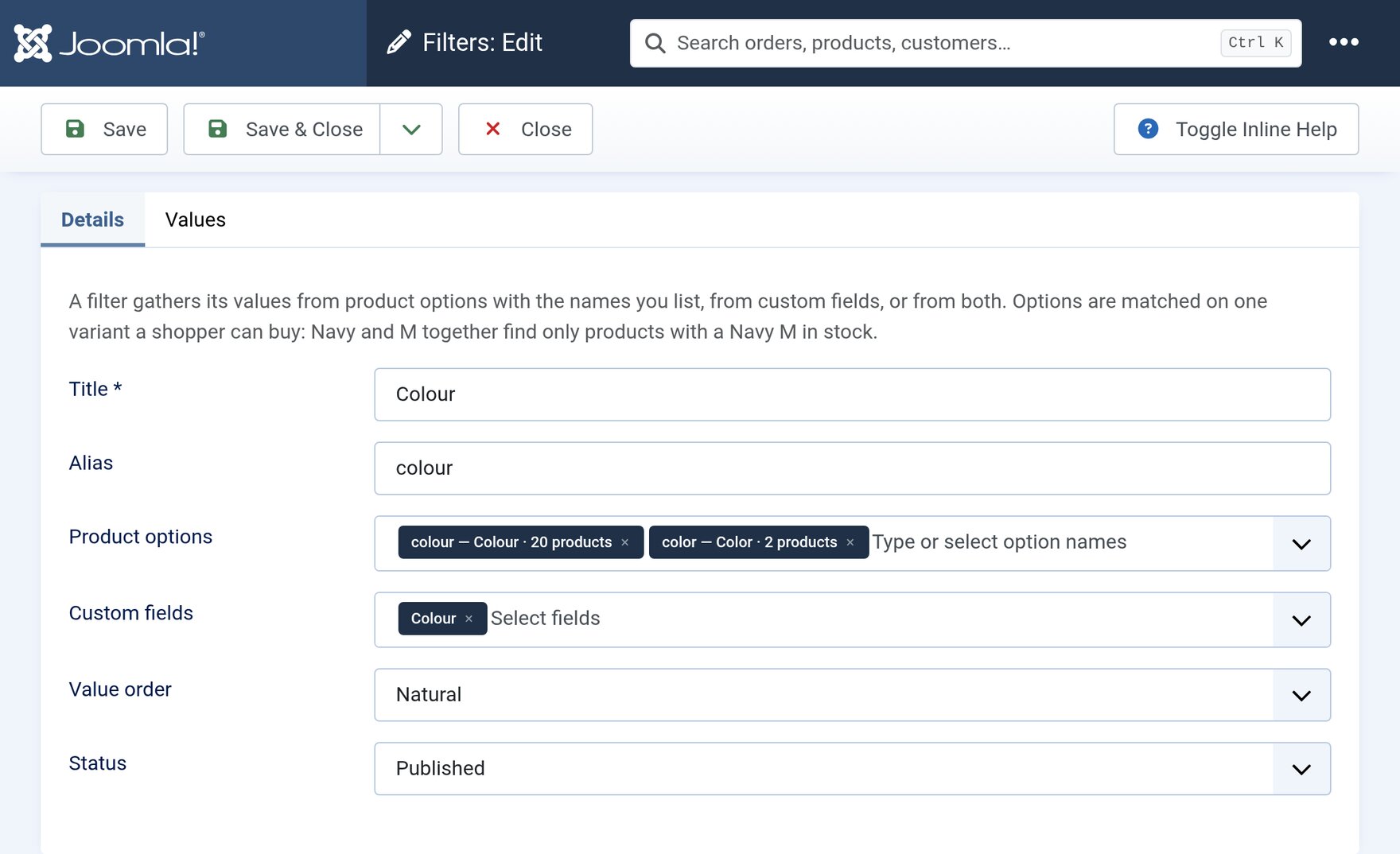
A new screen, Catalog › Filters, declares the filters the storefront offers on top of the built-in ones. A filter reads one or more product option names, one or more custom fields, or both: a Colour filter that reads the options named Colour and Color, a Size filter, a Material filter fed by a list custom field. Filters are declared rather than discovered, so a one-off option such as “Engraving” never turns up in the panel.
Option names are typed per product, so they drift. Solidshop matches names and values ignoring case, spaces and punctuation, and the form suggests the names your products already use, with every spelling and how many products carry each — so “Colour”, “colour” and “Color” end up in one filter. A filter’s Values tab lists every value it gathers, the other spellings merged under each, and where each comes from: the place to spot a stray “Navy blue”. Values are ordered naturally — XS, S, M, L, XL, then numbers, then A to Z — or by Most products first.
One variant a shopper can buy
A filter that checks each value on its own gets clothing wrong. A T-shirt sold in Navy/S and Black/M has a navy variant and an M variant, but no navy M, and a shopper who ticks both should not see it. Solidshop’s option filters match one variant: Navy and M together list a product only when a single variant is both, and that variant is in stock (or its stock is not tracked). If the navy M sells out, the T-shirt leaves Navy + M at once, while Navy alone and M alone still list it as long as another navy or M variant is in stock. Custom-field filters describe the whole product and never look at stock, like category and brand.
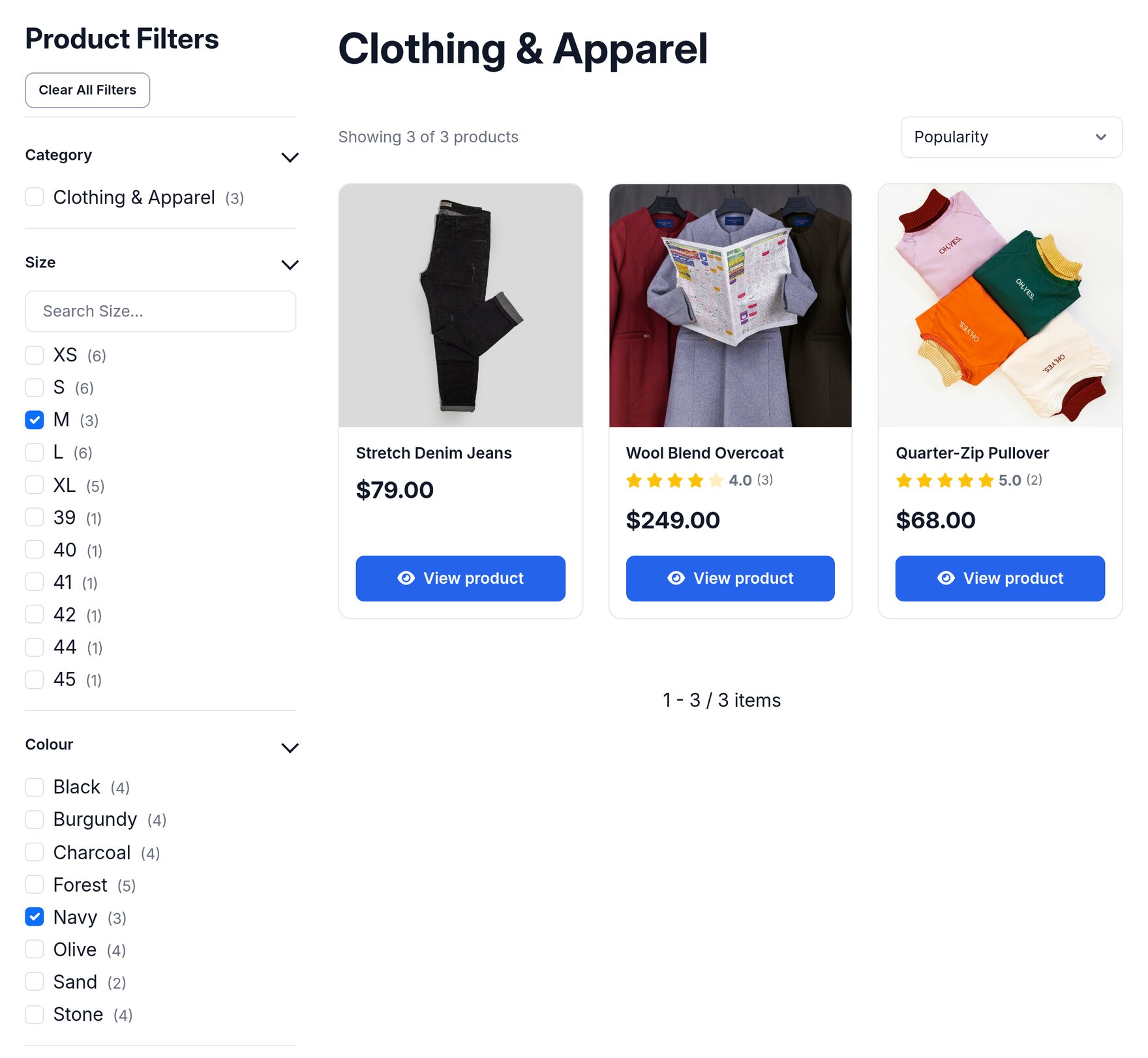
Every number in the panel follows the same rules: the count next to a value is what ticking it lists. An In stock toggle keeps only products a shopper can buy now, and only appears when it would leave something out. A filter with no value on the current listing stays out of the panel, so a Screen size filter does not show on a clothing category.
Filters travel in clean URLs —
?filter_colour=black,navy&filter_size=m —
with the same values in every language, and filtered listings ask
search engines not to index them while still following their links
to your products. Solidshop keeps an index of the values each
product carries and updates it as you save products, variants and
custom fields; stock is read live, so selling out a size changes the
filters straight away. To rebuild it yourself there is
Rebuild index on the toolbar, and for a catalogue
of any size,
php cli/joomla.php solidshop:filters:rebuild. The
filters guide covers declaring,
matching and the index in full.
Colour and image swatches
Every option in the product form gets a Show values as setting: Text buttons (the default, and what every existing option stays), Colour swatches or Image swatches. Under colour, a colour picker sits in front of each value and the product page shows a round chip per value. Under image, you upload a swatch or pick one from the store’s swatch library, and the page shows a thumbnail per value.
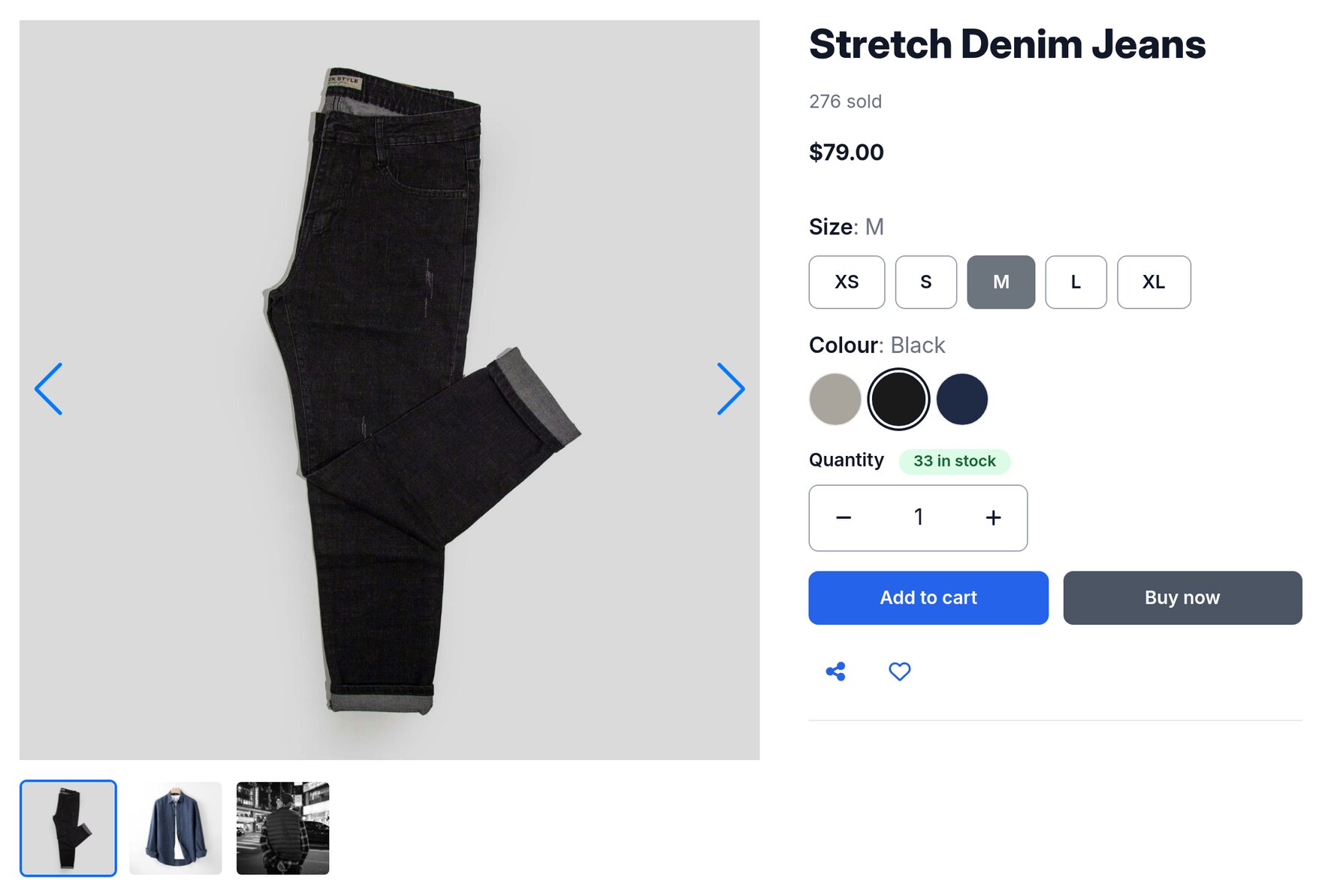
Swatch images belong to the store, not the product. They live in a folder of their own, apart from product photos, are cut to a 120px square, and the same “Navy” swatch serves every product that comes in navy. If you already gave each colour variant a photo, you do not need to upload anything: an image-mode value with no swatch borrows the image of a variant that has one, so flipping the setting is enough.
The picked value’s name follows the option name (“Colour: Navy”), shows on hover and is read to screen readers, and each option is now a proper radio group. The selected chip carries a ring parted from it by the page background, so it reads on a chip of any colour, even one that matches the page. Swatches work in dark mode, right to left, in CSV export and import, and in the catalogue API and MCP product tool. See option swatches in the products guide.
Specifications that belong to one product
Custom fields are Solidshop’s shared attributes: you define Material once and every product in a category fills it in. They are the wrong tool for a fact that only one product has — a lamp’s wattage, a book’s page count — and until now that meant creating a site-wide field for it or typing a table into the description.
A new Specifications tab on the product form takes rows of a label and a value, Wattage: 60 W, with nothing to define first. The product page lists them in its Specifications tab after the custom fields shown there.
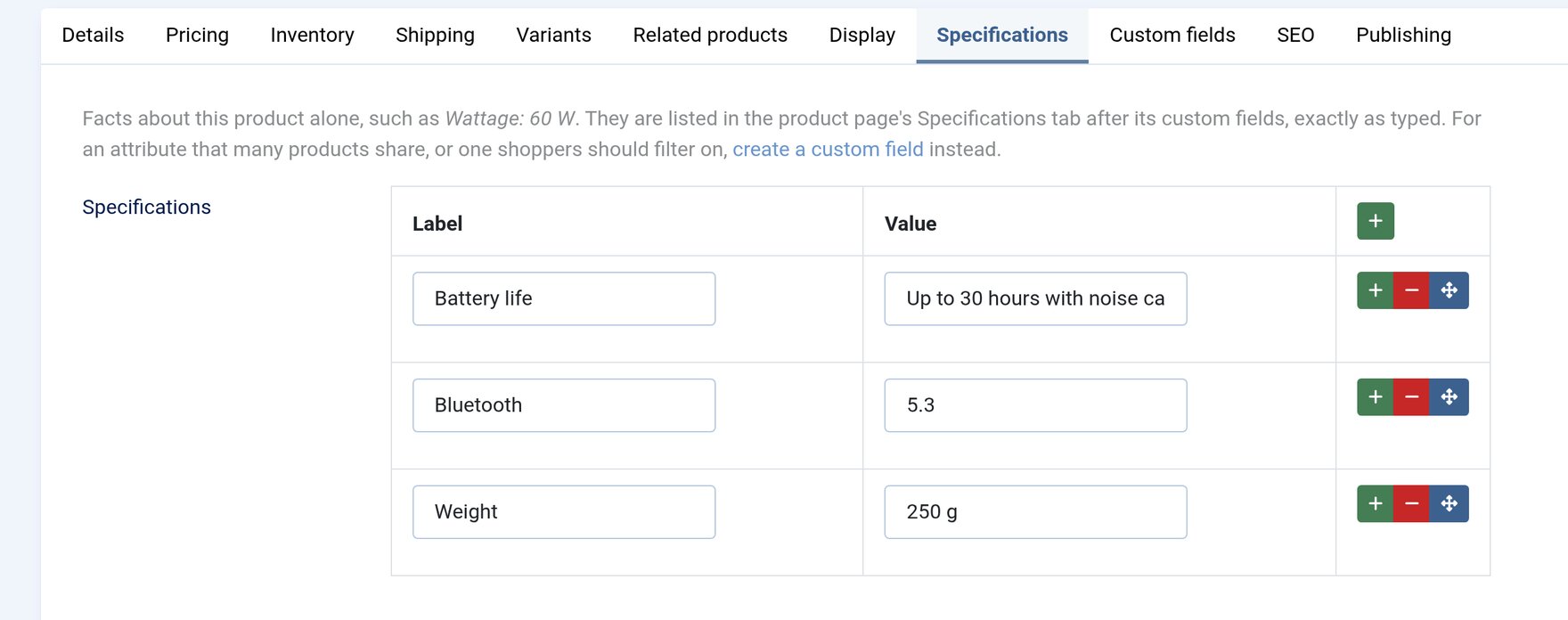
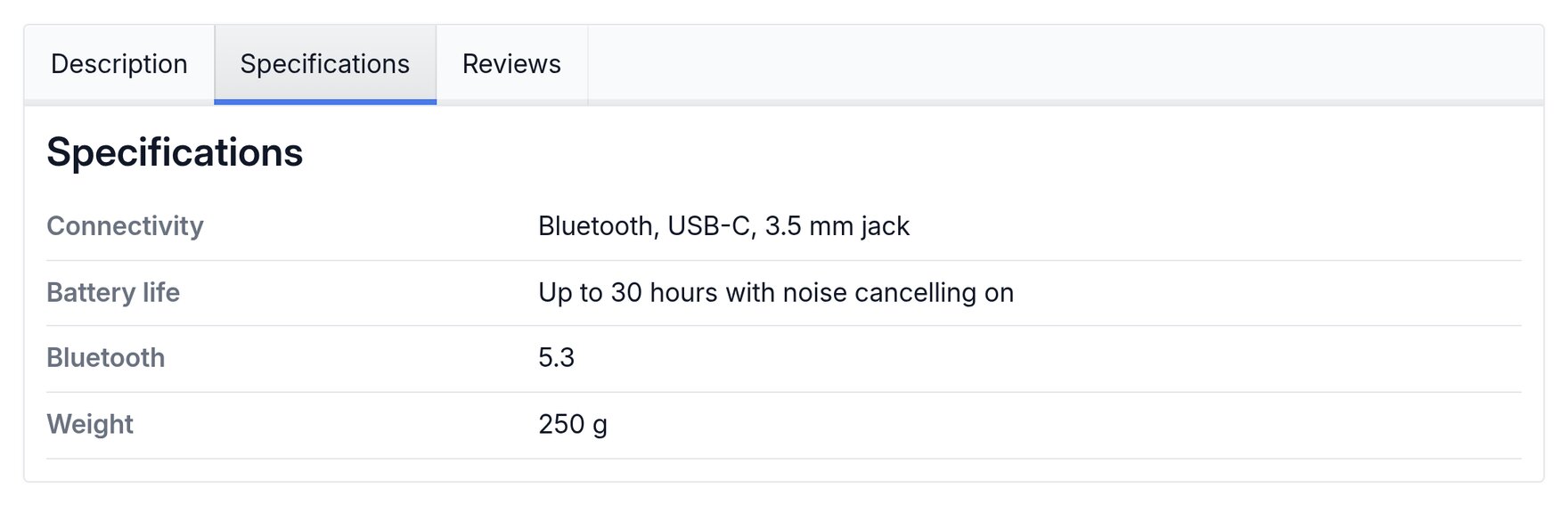
Rows are plain text, shown exactly as typed, so
<5 mm reads as written. They translate in the Translations drawer as one
Label: Value per line, or two columns pasted from a
spreadsheet, and they travel with the product: into its structured
data, Smart Search, CSV export and import, and the catalogue API.
They are never filters — an attribute many products share
belongs in a custom field. The
custom
fields guide helps you choose between the two.
Every variant, described to search engines
A product with variants used to be one Product in the
page’s structured data, with a list of prices and stock levels
and nothing to say which variant each belonged to. It is now a
ProductGroup, and each variant is a product of its own,
with its SKU, image, price, stock and a link that opens the page
with it picked. Colour, size, material and pattern options —
and any option shown as colour swatches — become the
variant’s color, size,
material or pattern.
A barcode that passes the GTIN check digit is published as a GTIN; a warehouse code is left out. An original price above the price becomes a struck-through price. And the price is now the one the page shows: a store that enters prices without tax and shows them with tax was telling search engines a lower price than shoppers read. Our post on what Google checks in product structured data explains why each of these matters.
Phone numbers with a country code
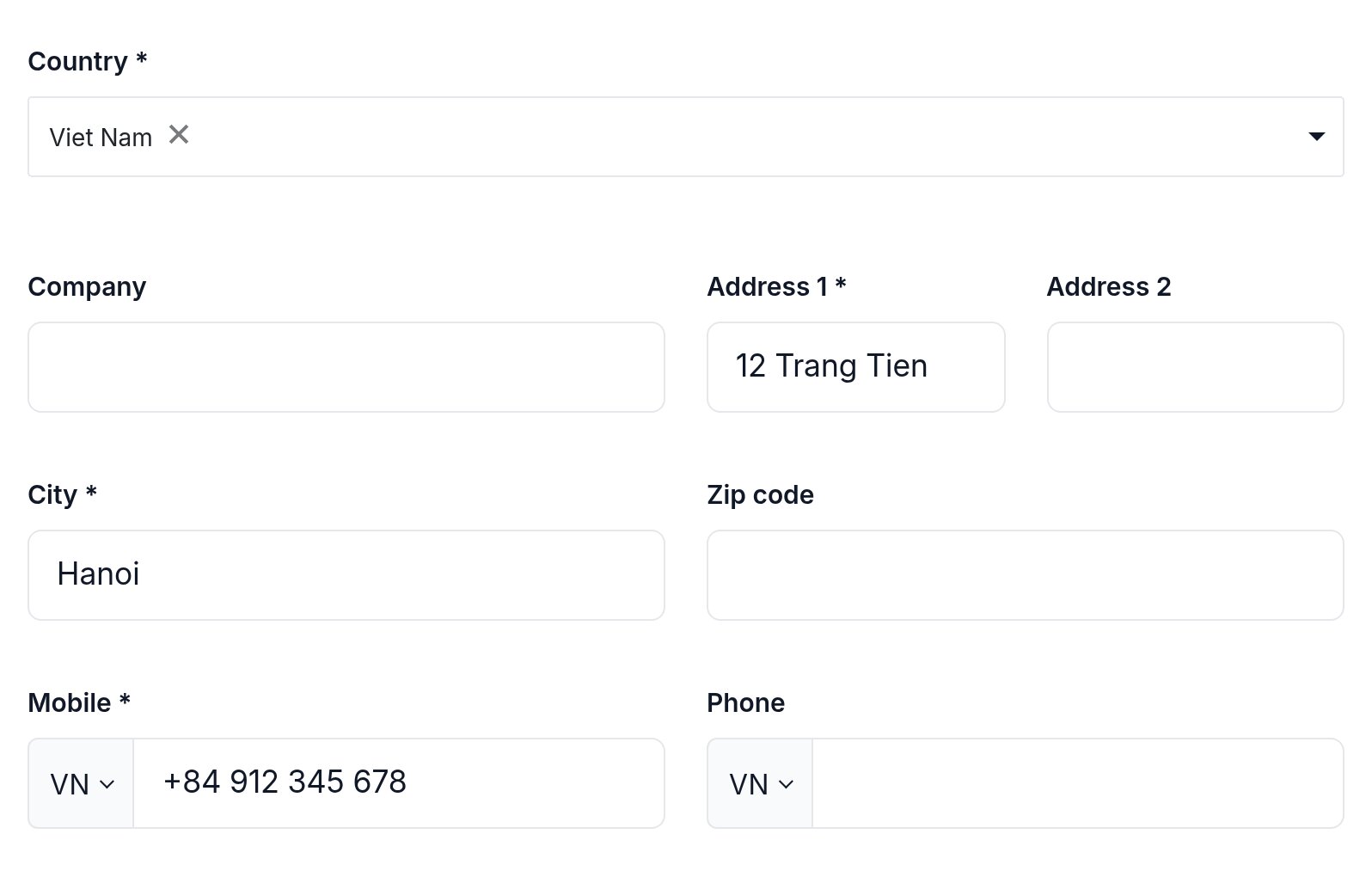
The address form’s Mobile and Phone —
at checkout, in the account address book and on the admin customer
and order screens — and the store’s Phone now
have a country code dropdown in front of the number. It starts on
the address’s country, and shoppers type their number the way
they know it: 0912 345 678 on a Vietnamese address is
saved as +84 912 345 678, so a courier, a payment
provider or you can dial it from anywhere. Mobile devices bring up
the dial pad, browsers fill in the shopper’s saved number, and each
number is checked for the right length for its country.
The customer’s phone now appears on the order page, under each address as a tap-to-call link; it was collected at checkout and shown nowhere. And formatted addresses print the customer’s first name again: the last name had been overwriting it in order emails, invoices, checkout and the admin order page. See phone numbers in the storefront guide.
Solidshop in the administrator menu
Solidshop now has a top-level entry in Joomla’s administrator menu, right below Home Dashboard, grouped Catalog, Sales, Customers, Marketing, Configuration, Localization and System. Until now that grouping was an opt-in menu preset that replaced the whole administrator menu, and everyone else had a flat list of 26 links under Components. Each user sees only the links they may open: a screen that needs Manage order or admin rights drops out of the menu for a user without them, where it used to answer the click with an error.
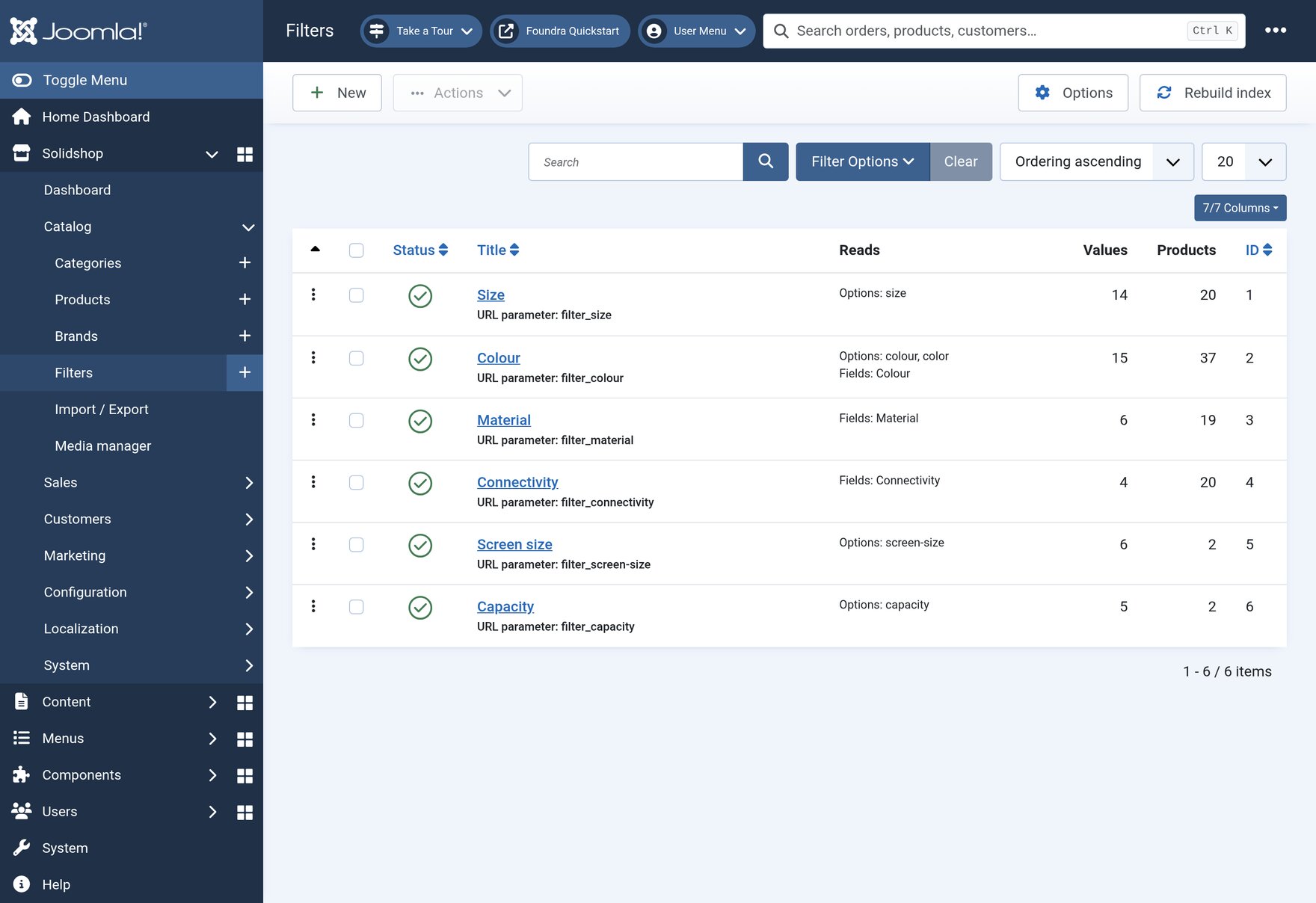
The grid icon next to the entry opens a Solidshop dashboard: a card for each menu group, with the pending, unpaid and unfulfilled order tiles across the top. Like any Joomla dashboard, it takes modules of your own.
Which template overrides need attention
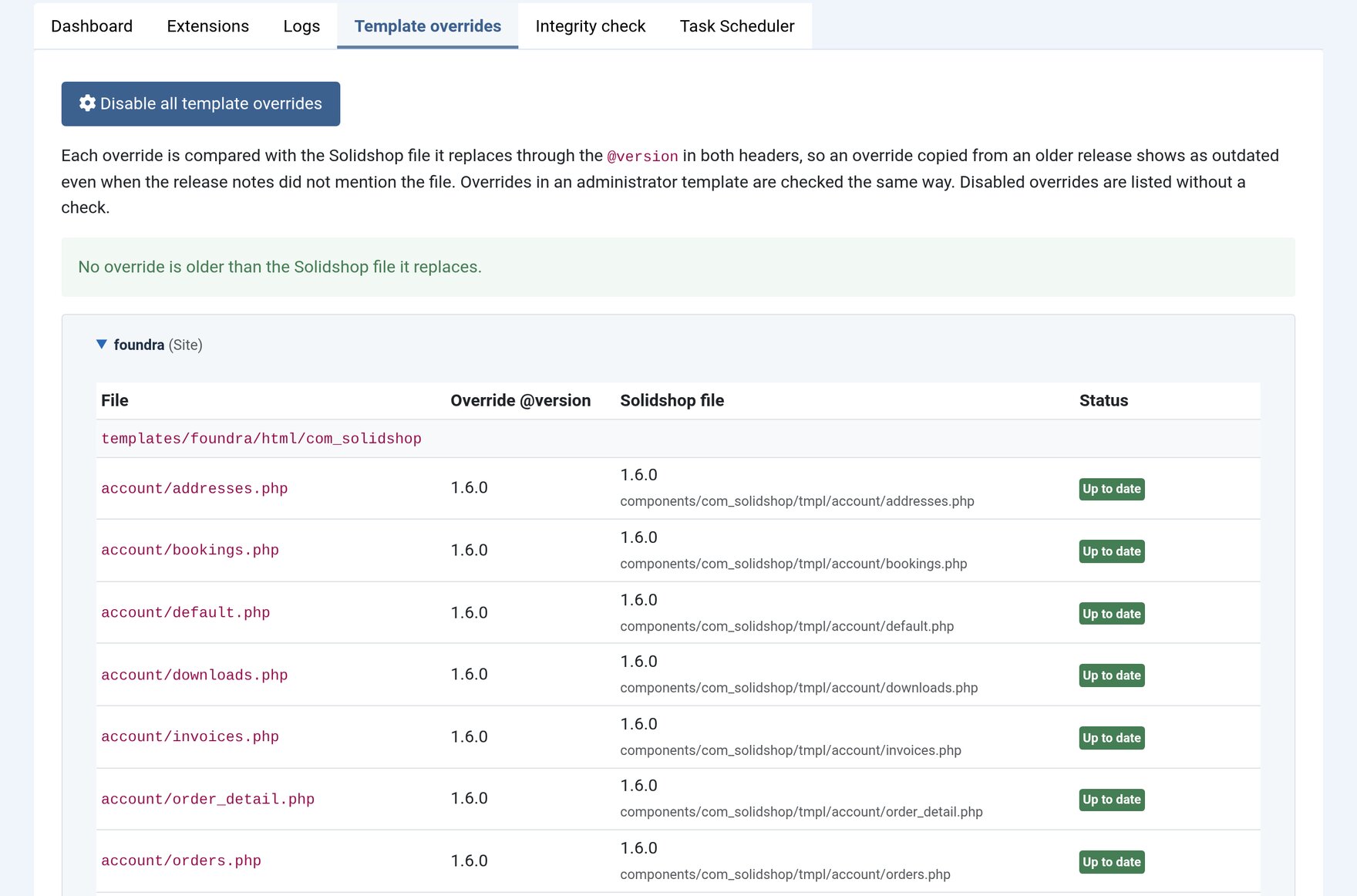
The System page’s Template overrides tab used
to list the override files it found and leave the judgement to you.
Every file a template can override now carries the version of the
extension that ships it, and the tab compares each override with
the file it replaces: Outdated, Unknown age,
Up to date, Not checked or No Solidshop
file. Only an outdated override turns the summary red, and one
that Joomla’s Updated Files list knows about links
there so you can mark it checked. Overrides you copied before this
release show as Unknown age: compare each with the file it
replaces, then copy that file’s @version line
into its header.
@versionOne per order
A new Limit to one per order switch on the product’s Inventory tab lets a shopper buy one of a product in an order, whichever variant they pick, the way WooCommerce’s Sold individually does. The product page shows no quantity box for it, the cart states the quantity as text, and adding it again or asking for two is refused with a message that says why. New subscription products start with the switch on. The Batch button on the Products list, which opened nothing before, now sets it on many products at once, and CSV import reads WooCommerce’s Sold individually? column. See one per order in the products guide.
Tax on shipping, and on orders you enter
Every tax rate has had an On Shipping box, and until now it did nothing: no order paid tax on its shipping. A rate with the box ticked now taxes the shipping, after any shipping discount, the way it taxes the goods — added on top when you enter prices without tax, taken out of the shipping price when you enter them with tax. An order with products in several tax classes splits its shipping between them by what the products in each class cost. The checkout summary, the order screens, the order e-mail, the invoice and the Tax collected report all show it.
Two more tax fixes. An order created or changed on the administrator’s order screen now gets its tax worked out the way checkout does; before, a new order there recorded no tax, and changing an order’s products kept the tax it had. And changing Price input type no longer moves the totals of orders already placed, because each order now records whether its prices included tax. The tax guide has the details.
Security fixes
Four fixes, all in the core. We recommend updating promptly.
- Guests could be shown each other’s pages. With Global Configuration › Cache switched on, the first guest to open the cart, the checkout, an order confirmation or the order tracking page had that page stored, and every later guest was shown it: another guest’s cart, name, address and order. Those pages are never cached now, catalogue pages are cached only for guests who have not picked a currency, filled a cart or entered a coupon, and Joomla’s System - Page Cache plugin skips every Solidshop page. Signed-in customers were never affected.
- The storefront listing took its scope from the URL. A crafted listing URL could make it show unpublished and trashed products, by name and price, to any visitor. The listing now ignores every request parameter that sets what it may list.
- E-mail templates render in a sandbox. A template edited in the administrator could call PHP functions and reach the site’s configuration, database password included, and it was handed the store’s payment and carrier settings, which hold the Stripe, PayPal, Square and Shippo keys. Templates now render with an allow-list of tags, filters and functions and no longer see those settings. Opening and saving them also asks for the rights the store screen asks for; before, any user allowed into the Solidshop administrator could.
- The bundled libraries move past their published advisories: Dompdf 3.1.6, which draws invoice PDFs, Twig 3.30, which renders every e-mail, and Guzzle 7.15.5.
Also in this release
- Payments a gateway records count. With Generate invoices set to on payment, an order paid through PayPal, Stripe or Square — at checkout or later by webhook — now gets its invoice, and so does a free order. A full refund issued in PayPal’s or Stripe’s dashboard gives the stock back. Before, only the order screen did either.
- An order entered on the order screen is treated like a checkout order. Its lines record what each product is, and it gets the download links, booking, invoice and subscription a checkout order gets.
- Non-combinable discounts on different products both apply. “35% off Product A” and “30% off Product B”, each set to Product level, gave a cart holding both products only the first.
- Every storefront page has one main heading, and order statuses read in any colour: a status prints in the text colour with its own colour as a dot, where the pale default colours were as faint as 1.2:1. With Show Page Heading on, the menu item’s heading leads the page, as on Joomla’s articles (page headings).
- The product gallery’s slider loads from your own site. Swiper 11.2.10 ships with Solidshop instead of being fetched from a CDN on every product page.
- A fresh install files its storefront pages in a menu of its own, Solidshop, which no module shows, instead of adding five links to your main menu, and switches on the e-mail queue’s task plugin (the installer’s menu).
-
E-mails a cron-run task sends link to your site: with no
--live-siteon the cron line they used to link tohttps://joomla.invalid/. - The currency switcher works on pages Joomla’s page cache stored, and Solidshop installs on a site upgraded from Joomla 3.
- Filter counts match what the filter lists. The Filters module counted every published product, so a count could promise products the page it led to did not show — ones outside the menu item’s categories, outside their publish dates, or not matching the search term. Every count now comes from the same query as the listing, and the price slider spans the products the listing can show.
- Filtered pages are never served from the page cache. With Joomla’s cache on, a shopper who filtered, sorted or searched could be shown the unfiltered page.
- With Hide empty filters on, a hidden category, brand or tag now comes back as soon as another change gives it products again, and the option works with Show counts off.
-
Add to cart works on a link to a deleted variant.
The product page script stopped on a
?variant=id that no longer exists, and both buttons did nothing. - A product translation without a name keeps the product’s name. A CSV import that filled only some translation columns blanked the translated name and URL alias; the update repairs translations already saved that way.
- Custom field labels written as language keys are translated on the product page, in structured data, in the catalogue API and on orders.
- The variant image picker lists images only, not video posters and 3D models.
- Administrator template overrides of the customer address list, the search-engine preview, the option editor and the Invoice plugin’s recurring screens were silently ignored. They apply now.
- All 22 translated languages carry this release’s new strings.
Released alongside 1.7.0
Five extensions have updates that go with this release.
Foundra 1.1.0
The Foundra storefront shows 1.7.0’s colour and image swatches and specification rows on the product page. Its chips are the same height as the text buttons beside them and at least 44px tall, so a row that mixes the two stays on one line and is easy to tap. Joomla’s Smart Search gets a Foundra results page and search box in the template’s own form controls and colours, with each result under its own heading, sort options as chips, and results pages kept out of search engines. A new Chips layout for the Menu module draws one level of links as a row of pills, for a blog’s topics or a catalogue’s sections.
On Persian, Arabic and Hebrew pages Foundra now loads Bootstrap’s right-to-left build, so Joomla’s own views and third-party extensions mirror properly too, and the error page prints your custom head and body code, so analytics records visitors who land on a broken link. Every override states the version of the file it mirrors, which 1.7.0’s override check reads.
An accessibility pass gives every page a main heading and brings text in the brand colour, order statuses, muted text and the footer to readable contrast in all five presets, light and dark; a Primary Color you set gets readable shades worked out from it. The closed mobile menu no longer takes keyboard focus, and every part of the page sits inside a landmark. Foundra also hides the quantity box for a product sold one per order, and its checkout summary includes the tax on shipping. Foundra 1.1.0 requires Core 1.7.0. Foundra changelog
VirtueMart migrator 1.1.0
The VirtueMart migrator now brings VirtueMart’s descriptive custom fields across as the product’s new specification rows, in VirtueMart’s order: string, text area and date fields shoppers saw on the product page, dimension and weight properties written as “45.5 cm” or “1.2 lb”, and cart attributes with a single fixed value and no surcharge. Until now the report only counted them as left behind; it now names each field that stays behind and why, and any value or row cut to fit Solidshop’s limits is reported against its product. Brands resolve within the store you migrate into, and the wizard’s 22 translations now install. It requires Core 1.7.0. What migrates · Migrator changelog
Downloadable Products 1.0.2
Downloadable Products installs on a second Joomla site that shares a database with another. Joomla allows that under a different table prefix, but the plugin named its two foreign keys without the prefix, so the second install failed with “Duplicate key on write or update”. The update renames the keys on an existing site.
With Core 1.7.0, a download link’s time limit runs from the payment rather than the order, so a bank transfer that clears five days later no longer leaves a 7-day link with two days to go, and an order entered on the order screen gets its links. My Downloads has a main heading and says in readable text why a file cannot be downloaded, and its pages carry the version stamps the new override check reads. It still runs on Core 1.4.0 and later. Downloadable changelog
PayPal Checkout 1.0.4
If two of your sites take payments through one PayPal app, update PayPal Checkout now. PayPal sends every event of an app to every webhook on it, and the plugin matched an event to an order by its number alone, so a payment for order #4370 on one site could mark the other site’s order #4370 paid, and e-mail its customer. Refunds crossed over the same way. Events are now matched on PayPal’s own ids, another site’s events are acknowledged and ignored, and saving a store warns when its PayPal app already sends events to another site. Refunds issued in the PayPal dashboard also reconcile when PayPal leaves out the order reference. One app per site · PayPal changelog
Reviews 1.1.1
Reviews’ My Reviews page has a main heading and reads its star ratings out (“4 out of 5”). In the administrator, searching the Reviews list no longer ends on an error page, and the Reviews and Review Reports lists sort by a column, with Joomla’s standard filter bar. Reviews changelog
For developers
-
Product structured data:
onSolidshopProductJsonLdlisteners now receive aProductGroupfor a product with variants. Facts about the whole product (ratings, reviews, extra properties) still go at the top level, and the Reviews plugin needs no update, but offers moved: each entry ofhasVariantcarries its own, and aProduct’soffersis a single Offer rather than a list of one. -
Solidshop\Lib\Facetholds the filter rules —FacetKey,FacetSelection,FacetMatchand the index builder, pure and unit-tested. The listing’s scope isSolidshop\Lib\Product\ListingScope, and the listing JSON’sfacetsgainsattributes,stockandstock_total. -
The
SolidshopPhoneform field andSolidshop\Lib\Phone(PhoneNumber::toE164(),telHref()) for anything that dials or sends a number. -
OptionDisplay,OptionSwatchandSwatchLibraryfor swatches; the catalogue API gives each option adisplayand each value aswatch. -
Solidshop\Lib\Product\ProductSpecsis the one set of rules every specification writer uses; the site product item carries the rows on$item->specs. -
A new administrator view needs its link in
presets/solidshop.xmlas well as the manifest’s<submenu>, and a preset item’spermissionattribute now hides it from the menu entry too. -
OrderPaymentStatusChangedEvent(onSolidshopOrderPaymentStatusChanged) fires whenever an existing order’s payment status changes, whoever stores it: a gateway’s return or webhook, a refund, the order screen.AfterOrderCreatedEventnow also fires for an order created on the order screen. -
E-mails render in Twig’s sandbox, so a partial a plugin adds
through
TwigPathsRegisterEventmust keep to the same allow-list.store.paramsreaches a template without itspaymentsandshipping_carriersgroups; pass a setting an e-mail needs throughBeforeEmailRenderEvent. -
TaxHelper::computeOrderTaxBreakdown()taxes an order’s lines and shipping in one call, and#__sshop_orders.prices_include_taxrecords whether an order’s prices included tax; grand totals read it.
Updating
Core 1.7.0 is a one-click update from System › Update. It adds swatch and specification columns to products and options, two tables for filters, and a column that records whether each order’s prices included tax. No filter exists and no option shows as swatches until you set one up.
Things to do afterwards:
- If you use Foundra, update it to 1.1.0 straight after the core. Foundra 1.0.1 keeps working on 1.7.0, but it shows every option as text buttons and no specification rows. Foundra 1.1.0 refuses to install until the core is on 1.7.0.
- Check your edited e-mail templates. Open each template you changed under Stores › Email Templates and preview it. If Preview reports something a template can no longer use, that e-mail goes out with the default template until you change it; templates you never edited are unaffected. The template syntax lists what a template can use.
- Check the On Shipping box on your tax rates. It did nothing before; now a rate with it ticked taxes the shipping of every new order. Tick it where your country taxes delivery and clear it where it does not. Orders already placed keep the tax they recorded.
- On a large catalogue, finish the filter index. The update builds it, but stops after about 20 seconds; Catalog › Filters then shows how many products are left, with a Finish building button. The storefront works meanwhile.
-
Open the System page’s Template overrides
tab. Update anything marked Outdated from the
shipped file. An override of the Filters module needs it most: its
checkboxes stop filtering until it is updated. Overrides of
product/fields.phpandfield/options.phpkeep working but show no specification rows or swatches until updated, and overrides of the account pages, the cart, the checkout and order tracking keep their old headings and status colours. - Update PayPal Checkout, Reviews, Downloadable Products and the VirtueMart migrator from the same screen, if you have them installed; the migrator needs the core on 1.7.0 first.
- Phone numbers already saved are not rewritten. Each one is shown in international form the next time its form opens, and saved that way.
For the complete, itemised list of every change, including the upgrade notes for template and plugin developers, see the Solidshop changelog.