

- Posts: 6
- Thank you received: 0
Show Tax in Order and in CHeckout
1 month 9 hours ago #15
by Gunnar
Show Tax in Order and in CHeckout was created by Gunnar
Hi, I set Tax 19% as standard and products as including tax. But nowhere I can view the tax sum in the order or in the checkout. This is necessary. Howto?
Please Log in or Create an account to join the conversation.

4 weeks 2 days ago #16
by Viet Vu
Replied by Viet Vu on topic Show Tax in Order and in CHeckout
Hi,
Solidshop does show the tax amount. It appears as a tax line (for example "VAT 19% … €3.19") in these places:
- the order summary at checkout
- the order confirmation page
- the customer's order page under My Account
- the admin order screen
- the order email and the invoice
The cart page only says "Tax included in price". The amount itself appears from checkout onwards.
If you see no tax anywhere, the 19% rate is not being applied to the order. A rate only applies when its tax class matches the product and its tax zone covers the customer's address. Please check these under Solidshop → Stores → (your store) → Tax tab:
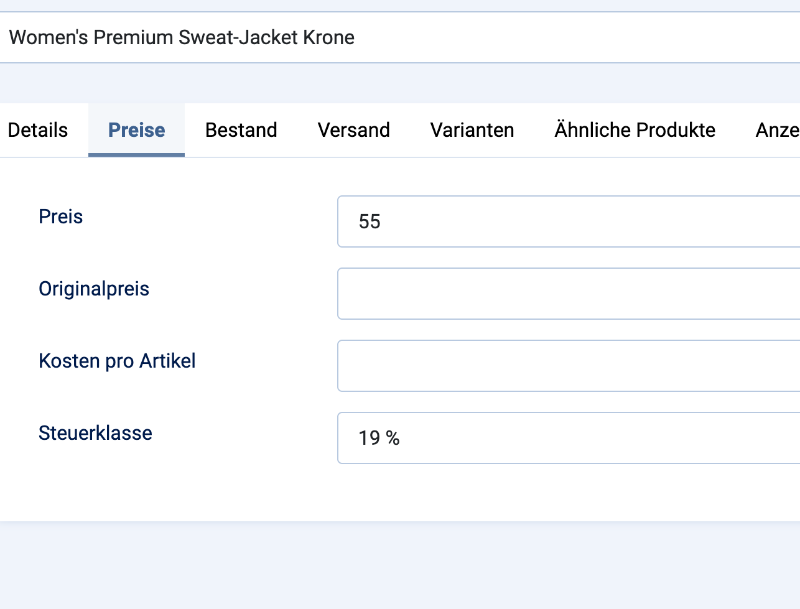
1. Tax class: one class (e.g. "Standard") is marked as Default. Products with the Tax class field left on "- Store default -" use this class. If no class is the default, those products are not taxed.
2. Tax zone: the zone has a territory for your country (e.g. Germany), with the state left on "All states / provinces", and the zone is published. A fresh install comes with a sample "Illinois" zone. If you changed the sample rate to 19% but kept that zone, addresses in Germany are outside it and get no tax.
3. Tax rate: 19%, linked to that class and that zone, and published.
4. Store address: the store's country is set to your country. Before the customer enters an address, tax is calculated at the store's address.
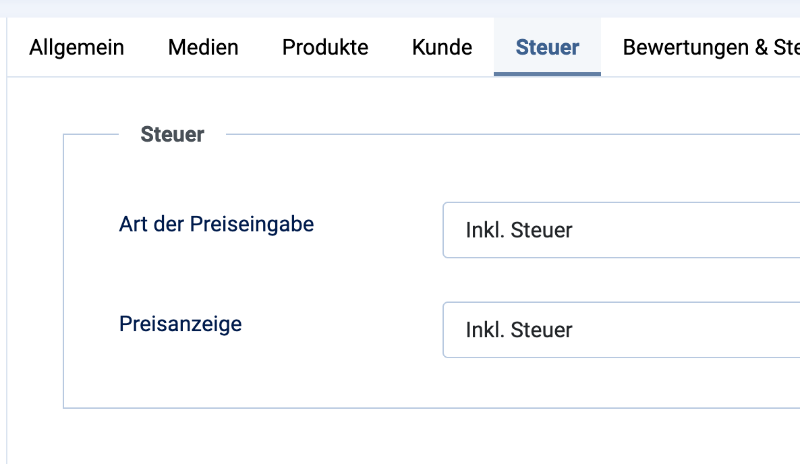
For tax-inclusive prices, use the setting in Solidshop's Options (System → Global Configuration → Solidshop → Tax): set "Price input type" to "Tax inclusive" and "Price display" to "Including tax". The "Inclusive" tick box on the rate row does not change the calculation.
Two more things:
- Which Solidshop version are you using? Before 1.6.0, products on "- Store default -" were never taxed. This was fixed in 1.6.0, so please update if your version is older.
- The tax is saved with the order when the order is placed. Orders placed before you fix the setup won't change, so place a new test order to check.
Guide: www.solidshop.app/support/docs/tax-configuration
If the tax still doesn't show, please send your Solidshop version and a screenshot of the Tax tab and we'll take a look.
Solidshop does show the tax amount. It appears as a tax line (for example "VAT 19% … €3.19") in these places:
- the order summary at checkout
- the order confirmation page
- the customer's order page under My Account
- the admin order screen
- the order email and the invoice
The cart page only says "Tax included in price". The amount itself appears from checkout onwards.
If you see no tax anywhere, the 19% rate is not being applied to the order. A rate only applies when its tax class matches the product and its tax zone covers the customer's address. Please check these under Solidshop → Stores → (your store) → Tax tab:
1. Tax class: one class (e.g. "Standard") is marked as Default. Products with the Tax class field left on "- Store default -" use this class. If no class is the default, those products are not taxed.
2. Tax zone: the zone has a territory for your country (e.g. Germany), with the state left on "All states / provinces", and the zone is published. A fresh install comes with a sample "Illinois" zone. If you changed the sample rate to 19% but kept that zone, addresses in Germany are outside it and get no tax.
3. Tax rate: 19%, linked to that class and that zone, and published.
4. Store address: the store's country is set to your country. Before the customer enters an address, tax is calculated at the store's address.
For tax-inclusive prices, use the setting in Solidshop's Options (System → Global Configuration → Solidshop → Tax): set "Price input type" to "Tax inclusive" and "Price display" to "Including tax". The "Inclusive" tick box on the rate row does not change the calculation.
Two more things:
- Which Solidshop version are you using? Before 1.6.0, products on "- Store default -" were never taxed. This was fixed in 1.6.0, so please update if your version is older.
- The tax is saved with the order when the order is placed. Orders placed before you fix the setup won't change, so place a new test order to check.
Guide: www.solidshop.app/support/docs/tax-configuration
If the tax still doesn't show, please send your Solidshop version and a screenshot of the Tax tab and we'll take a look.
Please Log in or Create an account to join the conversation.
4 weeks 6 hours ago #17
by Gunnar
Replied by Gunnar on topic Show Tax in Order and in CHeckout
This message contains secure information
Please Log in or Create an account to join the conversation.
3 weeks 5 days ago #18
by Viet Vu
Replied by Viet Vu on topic Show Tax in Order and in CHeckout
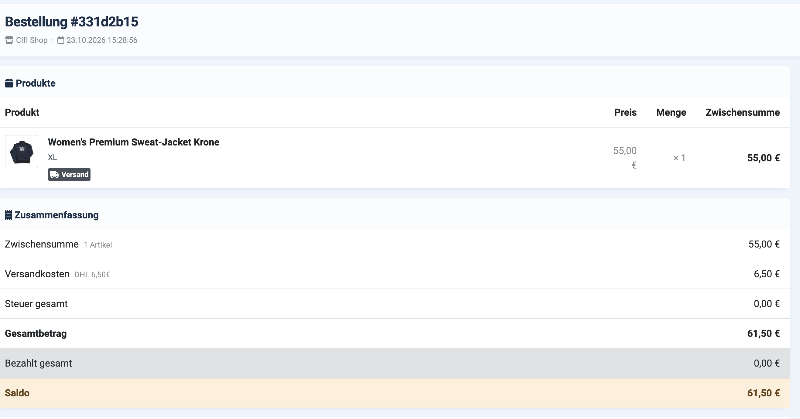
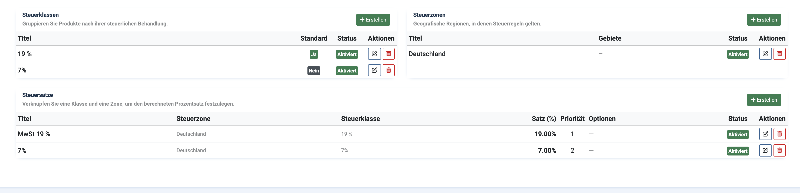
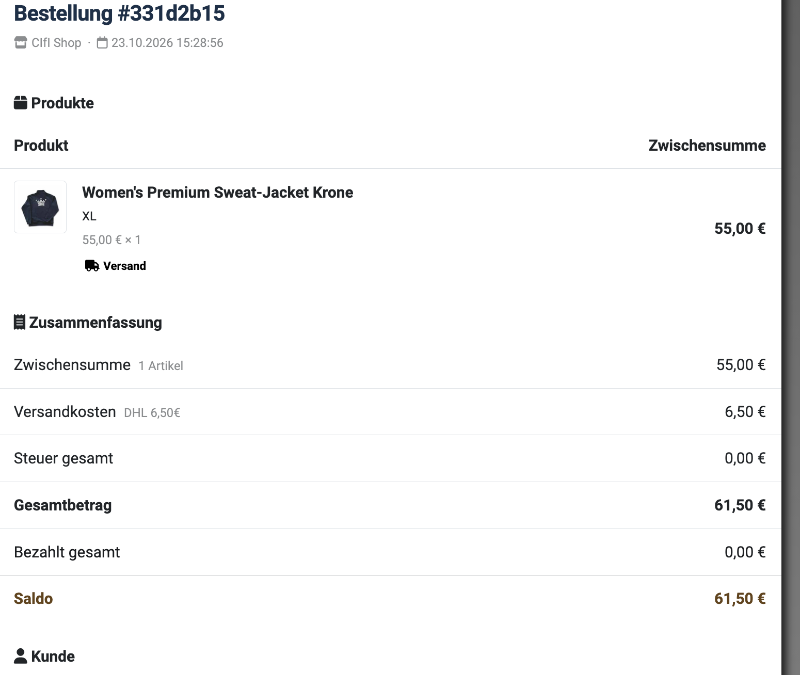
Thanks for the screenshots, they show the problem. In your Tax tab, the zone "Deutschland" has no territories (the "Gebiete" column shows "—"). The zone's name doesn't decide where it applies; its territories do. With no territory, the zone matches no address, so neither rate is used and the tax is 0.
To fix it:
1. Go to Solidshop → Stores → your store → Steuer tab and edit the zone "Deutschland".
2. Click "Gebiet hinzufügen", choose Deutschland as the country and leave the state empty (empty = the whole country). Save.
3. The Gebiete column should now show "Deutschland".
4. Optional: in Germany, shipping is normally taxed too. Edit the "MwSt 19 %" rate and tick "Auf Versand" (On Shipping) so the 6,50 € shipping includes VAT. This needs Solidshop 1.7.0 or later.
Order #331d2b15 was saved with 0 tax. Either place a new test order, or (on 1.7.0 or later) open that order in the admin and click "Bestellung aktualisieren" (Update order). That recalculates its tax with your current rates at the order's shipping address.
The next Solidshop version will refuse to save a zone without a territory, so this can't happen unnoticed again.
To fix it:
1. Go to Solidshop → Stores → your store → Steuer tab and edit the zone "Deutschland".
2. Click "Gebiet hinzufügen", choose Deutschland as the country and leave the state empty (empty = the whole country). Save.
3. The Gebiete column should now show "Deutschland".
4. Optional: in Germany, shipping is normally taxed too. Edit the "MwSt 19 %" rate and tick "Auf Versand" (On Shipping) so the 6,50 € shipping includes VAT. This needs Solidshop 1.7.0 or later.
Order #331d2b15 was saved with 0 tax. Either place a new test order, or (on 1.7.0 or later) open that order in the admin and click "Bestellung aktualisieren" (Update order). That recalculates its tax with your current rates at the order's shipping address.
The next Solidshop version will refuse to save a zone without a territory, so this can't happen unnoticed again.
Please Log in or Create an account to join the conversation.
3 weeks 4 days ago #19
by Gunnar
Replied by Gunnar on topic Show Tax in Order and in CHeckout
Thanks, you`re doing a good job! Would be good to place these info in the documentation. Keep on reacting so fast and your shop will become a good alternative to others!
Please Log in or Create an account to join the conversation.
3 weeks 2 days ago #20
by Viet Vu
Replied by Viet Vu on topic Show Tax in Order and in CHeckout
Hi,
Glad it's working now!
We've also updated the docs here: www.solidshop.app/support/docs/tax-configuration
Glad it's working now!
We've also updated the docs here: www.solidshop.app/support/docs/tax-configuration
Please Log in or Create an account to join the conversation.