
Type an ID on the store screen and each order reaches Google Analytics 4, Google Ads, Meta, Microsoft Advertising, TikTok, Matomo, Plausible, Umami or Fathom — with its value, and its products where the tool takes them, once, and only after the shopper agrees.
An ad platform spends your budget on whatever its purchase signal says is working. Without one, Google Ads and Meta optimise for clicks, and you work out your return on ad spend by hand from the orders list. With one, every campaign is measured, and steered, by the orders it brings in.
Getting that signal out of a Joomla store has meant one of two jobs. Either someone pastes each platform’s purchase snippet into a template override of the confirmation page and fills in the total from PHP, or someone builds a Google Tag Manager container with triggers, variables and a tag per platform. Both tend to go wrong in the same places: the purchase is sent again when the shopper reloads the page, it is sent before the shopper has agreed to cookies, the value includes tax for one tool and not for another, and no products go with it.
Today we are releasing the Solidshop Conversion Tracking plugin, which replaces both jobs with one field per tool on the store screen. It builds on what Core 1.8.0, released yesterday, puts in every store.
What the free core already does
Core 1.8.0 builds each order once on the order confirmation page,
with amounts taken from the order itself and products named by SKU,
and never for an order that was voided, cancelled or refunded. Turn
on Publish orders to the data layer on the
store’s new Tracking tab and the page pushes
the order to window.dataLayer as a GA4 ecommerce
purchase. It also ships a cookie banner of its own,
which holds scripts back until the visitor accepts and passes the
choice to Google tags through Consent Mode v2.
If you run Google Tag Manager and like building tags, that may be all you need: the conversion tracking guide has the steps. The plugin is for the store that would rather type an ID, and for the ad platforms, which do not read a GA4 data layer at all.
One field per tool
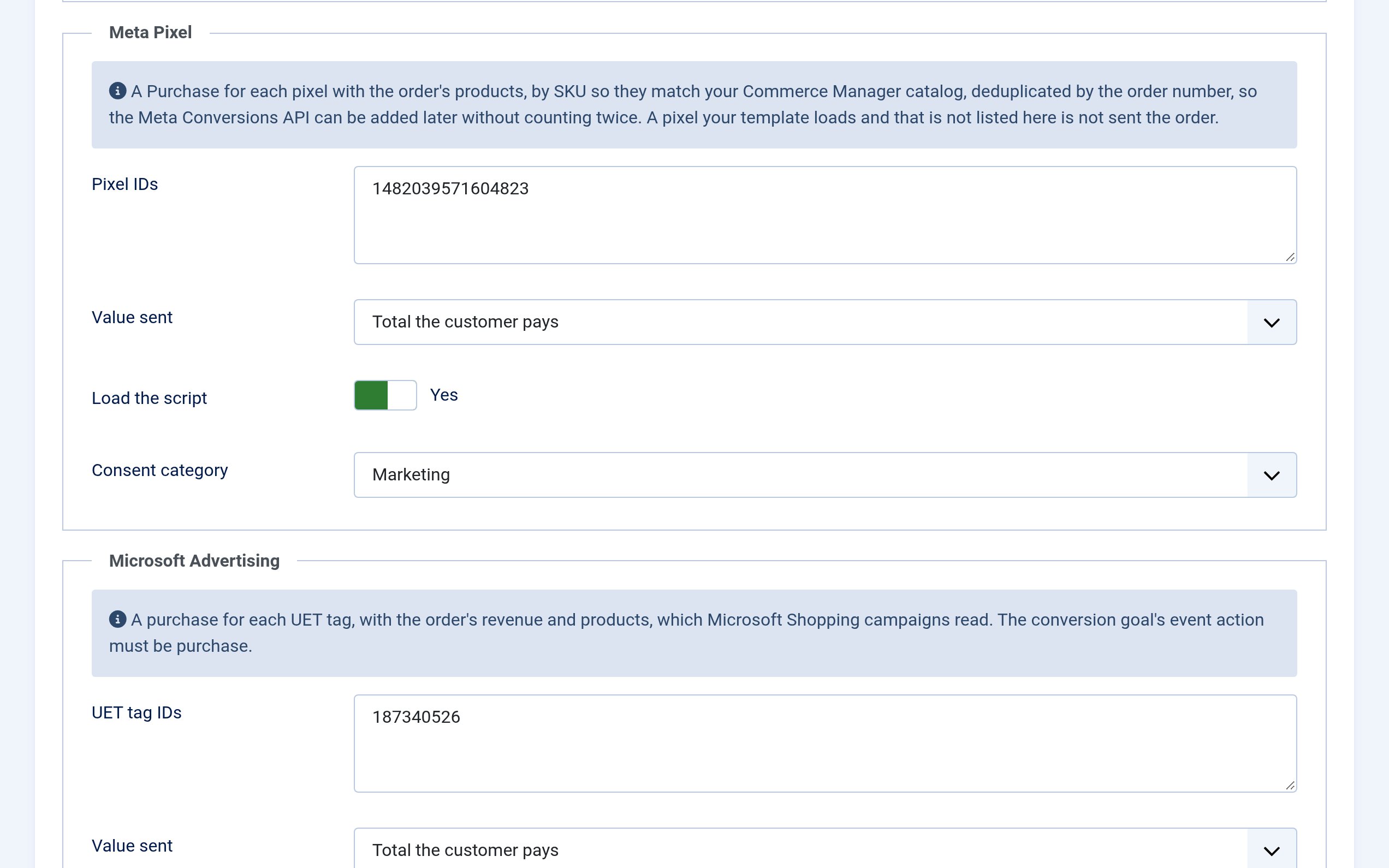
Install the plugin and the store’s Tracking tab gains a card for each tool. Paste the ID the tool gives you, save, and the plugin loads the tool’s script on the confirmation page and sends it the order in the shape it expects:
-
Google Analytics 4 — a
purchasewith the order’s items, tax, shipping and coupon, and whether the customer is new or returning. -
Google Ads — a conversion for each
conversion label, with the order’s value, its number for
deduplication and
new_customer, which the new customer acquisition goal needs to bid higher for first orders. Optional dynamic remarketing sends the products bought. -
Meta Pixel and TikTok — a
Purchasefor each pixel, sent to that pixel only. -
Microsoft Advertising — a
purchasefor each UET tag. - Matomo — an ecommerce order with its lines, tax, shipping and discount.
-
Plausible, Umami and
Fathom — a named event,
Orderunless you change it, with the order’s value, for a goal you create in the tool.
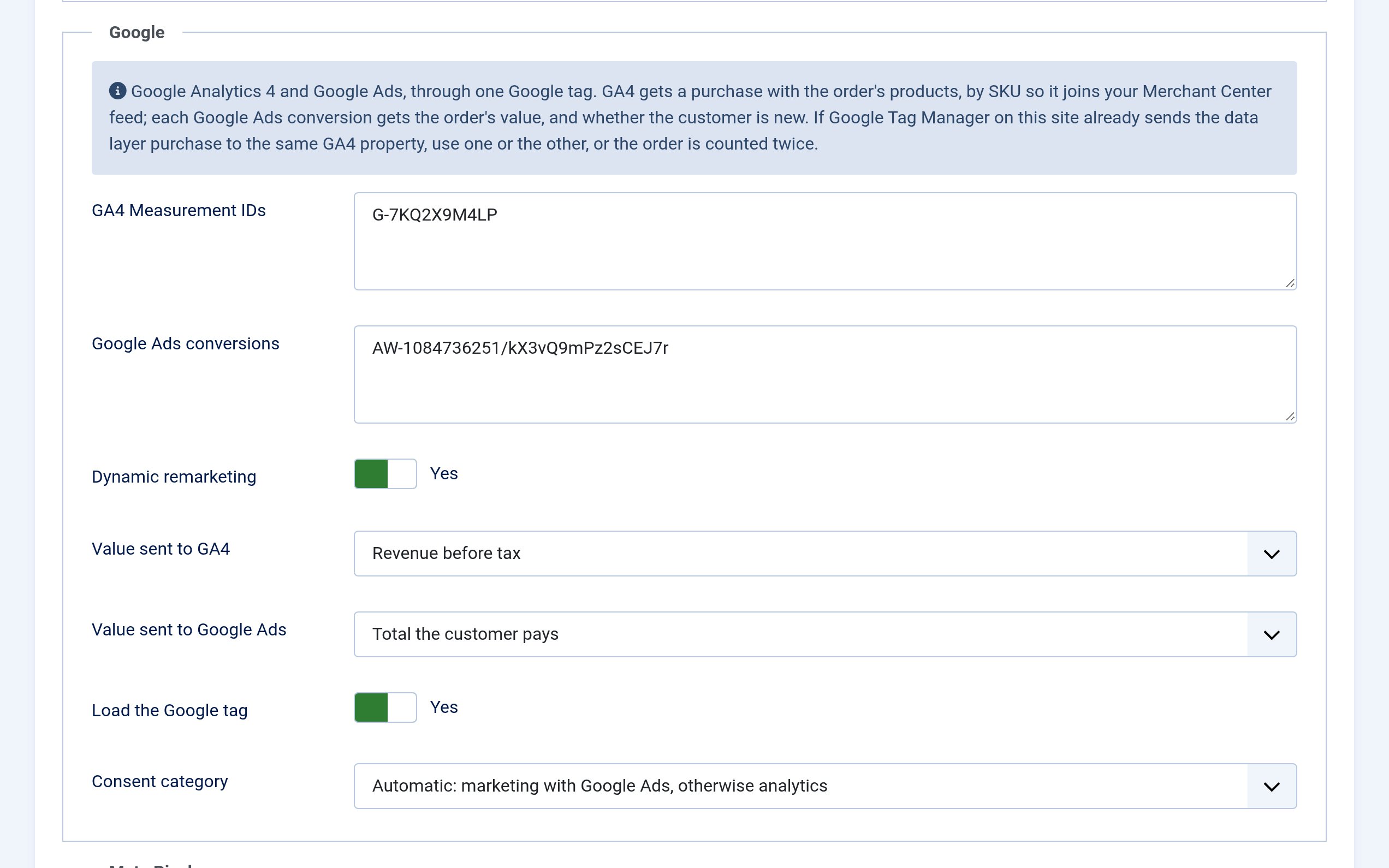
The Google, Meta, Microsoft and TikTok fields take several IDs, one per
line, for a store that reports to two GA4 properties or several pixels. An ID in the wrong format is
refused when you save, with the entry named, so a typo does not sit
there for a month collecting nothing. A Universal Analytics
UA- ID is refused too: Google stopped processing them in
2023.
Every setting belongs to the store. On a site with several stores, each reports to its own accounts, and the settings sit next to the store’s payments and shipping rather than in the Plugins screen, which only Super Users can open.
The right amount for each tool
Analytics and advertising disagree about what an order is worth. Your sales report counts the goods after discounts, without tax or shipping; an ad platform measures return on ad spend against what the customer paid. So every card has a Value sent setting, and the defaults follow the tool: Revenue before tax for GA4, Plausible, Umami and Fathom, Total the customer pays for Google Ads, Meta, Microsoft, TikTok and Matomo.
Take an order of $90 of goods after a coupon, $9.95 shipping and $7.43 tax. GA4 is sent 90.00, the figure your sales report shows. Google Ads and Meta are sent 107.38, what the customer paid. Both figures come from the order itself, so they match the order screen to the cent.
Counted once, and only when it counts
A reload, the back button or a shopper who accepts cookies on the confirmation page itself never reports an order twice. Meta and TikTok also get the order number as the event ID, so if you add their server-side APIs later, the two sources are matched instead of doubling your conversions.
Voided, cancelled and refunded orders are never reported, and since Core 1.8.0 a payment that fails at the provider voids its order before the confirmation page, so it is not counted either. Bank transfer and cash on delivery orders count from the moment they are placed, or not at all: Count orders not yet paid on the store decides.
Consent first
Ad and analytics tools set cookies, so in the EU, the UK and many other places they may only run after the shopper agrees. Out of the box every script the plugin adds waits for Solidshop’s own cookie banner: the ad platforms for Marketing consent, the analytics tools for Analytics. Google waits for Analytics while it only feeds GA4, and for Marketing as soon as it sends to Google Ads. Each card can change its category.
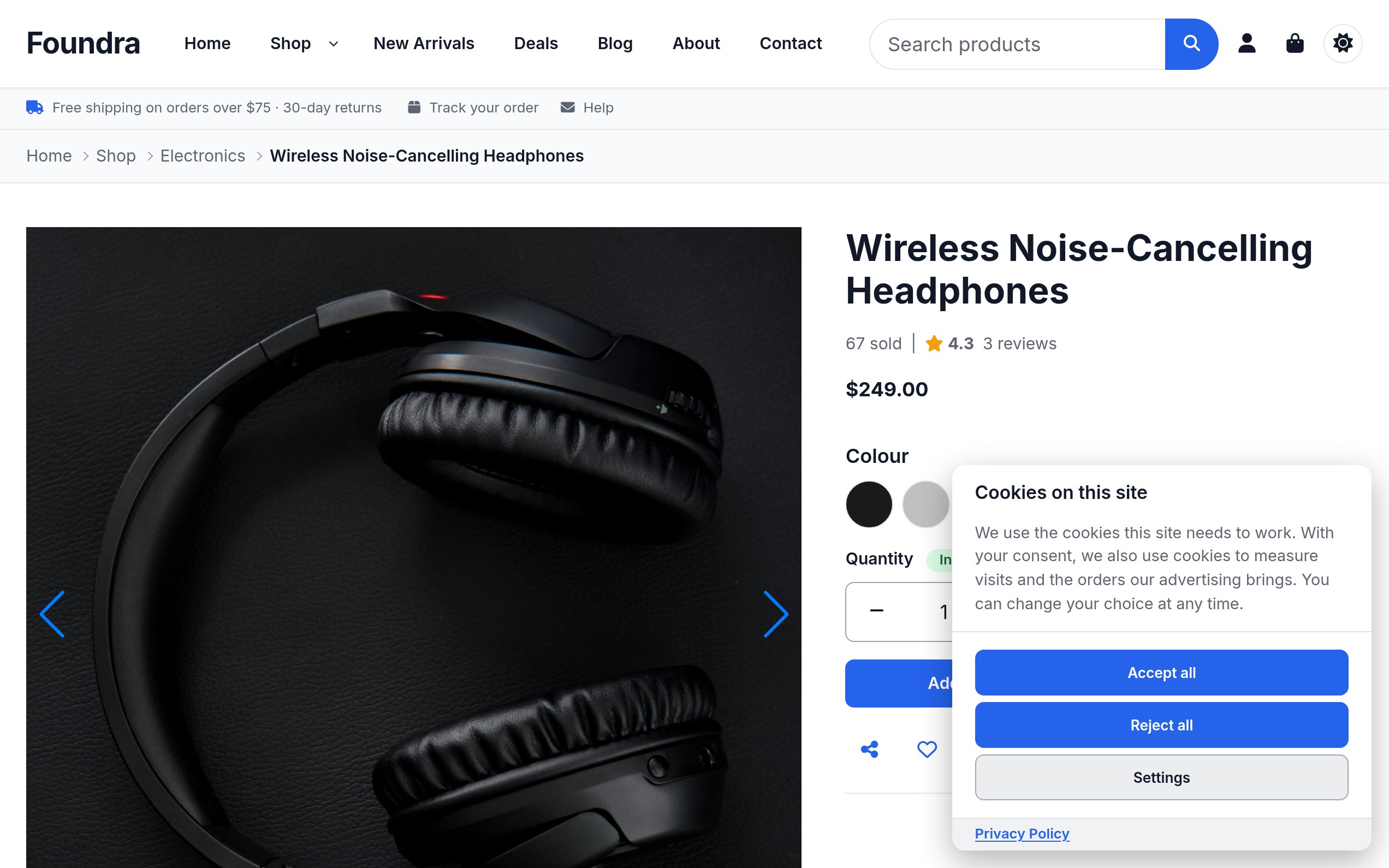
The banner asks while the shopper browses the shop. Asking first on the confirmation page would lose most sales: the shopper has what they came for and closes the tab. If the banner is off while a tool waits for it, the store screen says so, because nothing would ever run.
Already run another consent tool? The scripts can be written in the
markup of CookieConsent v3 (as YOOtheme Pro ships it), Cookiebot, n3t
Cookie Consent or Klaro, or blocked by a custom data-
attribute, and that tool does the asking. Or set consent to
None when Google Tag Manager decides which tags may run. The
plugin never sets Google Consent Mode itself; the banner does.
Products your feeds know
Google, Meta, Microsoft, TikTok and Matomo get the products by SKU, or by the product id when a product has none — the id Google Merchant Center and Meta’s catalog import from your product feed — so Shopping campaigns and catalog ads see which products sold, not only that something did. Switch on Dynamic remarketing and Google Ads also gets the products bought under the retail vertical, for remarketing ads built from your Merchant Center feed.
No personal data, and no page views
The tools get the order number, the amounts, the currency, the coupon and the products. They never get a name, an e-mail address or a postal address. Matomo tracks the order without its cookies unless you turn that off. That also means no Google Ads enhanced conversions and no Meta advanced matching: both need the shopper’s e-mail address.
The plugin measures sales, not visits. It loads the tools on the confirmation page and sends no page view, so your visitor numbers keep coming from the analytics you already run. If your template or Tag Manager already loads GA4 or the Meta Pixel on every page, switch off that card’s Load the script (Load the Google tag on the Google card): the plugin sends the order to the copy your site has, and nothing loads or counts twice. Don’t also send the data layer purchase to the same GA4 property from Tag Manager; use one or the other.
Every script the plugin adds carries the page’s nonce, so a Content Security Policy that allows only nonced scripts, as Joomla’s HTTP Headers plugin can set, runs the tools without exceptions.
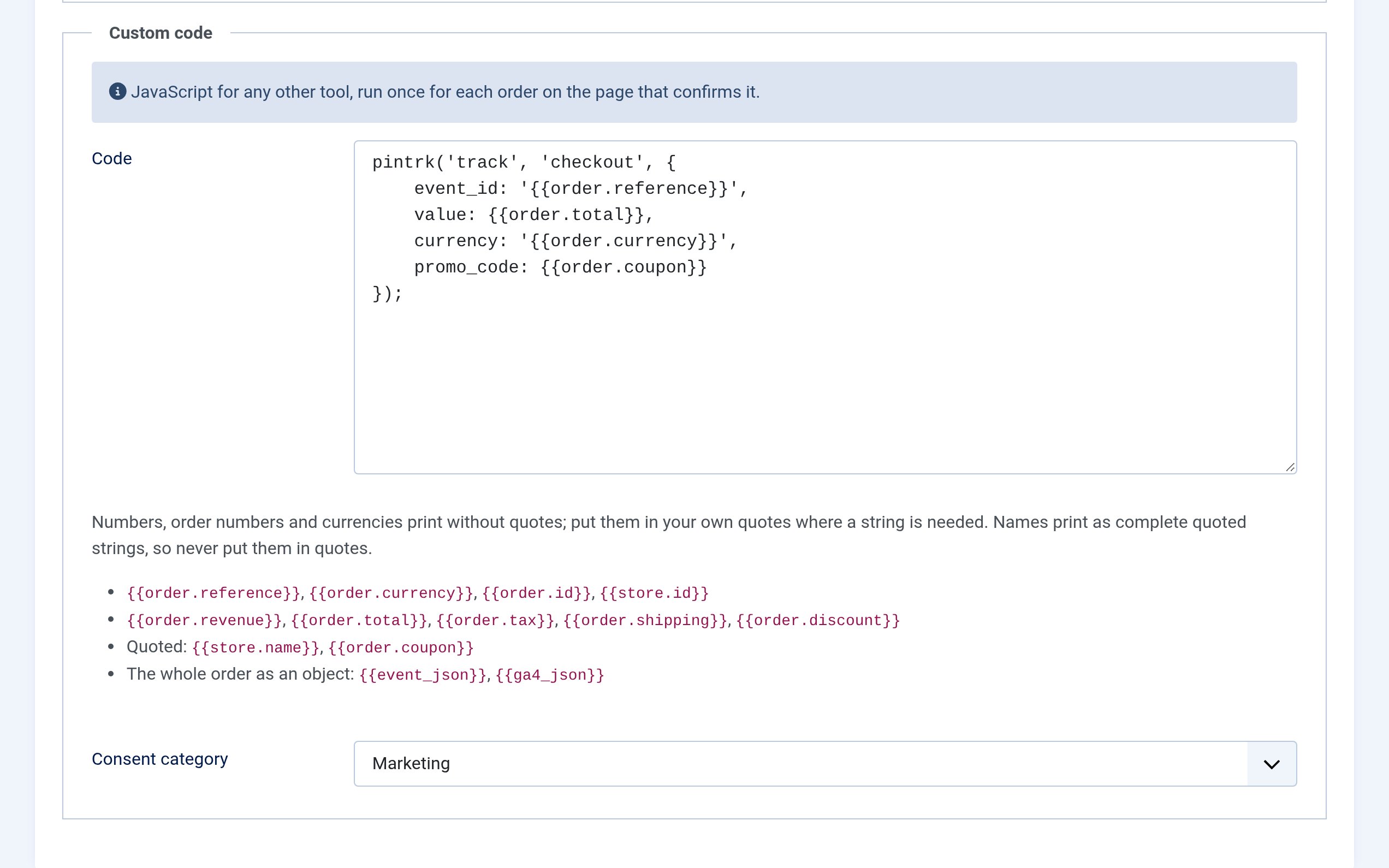
Anything else: custom code
Pinterest, an affiliate network, a CRM: for a tool that is not on
the list, the Custom code card runs your JavaScript
once for each order on the confirmation page. Paste the tool’s
snippet without its <script> tags and fill it from
tokens:
pintrk('track', 'checkout', {
    value: {{order.total}},
    currency: '{{order.currency}}',
    order_id: '{{order.reference}}'
});
There are tokens for the order’s number, amounts, currency, coupon and store, and for the whole order as JSON, and none for the customer. A token the plugin does not know is named when you save. The code waits for consent like the tools do, and because it runs on your storefront, only users who may change Solidshop’s Options can see or change it; anyone else who saves the store keeps it as it is.
Setting it up
-
Update Solidshop to 1.8.0, then install
plg_solidshop_conversionsthrough System → Install → Extensions. It is enabled on install and does nothing until a store has a tool set up. - Turn the cookie banner on in Solidshop → Configuration → Settings, on the Cookie consent tab, unless your site already runs another consent tool.
- Open Solidshop → Configuration → Stores, edit the store, choose the Tracking tab, paste your IDs and save.
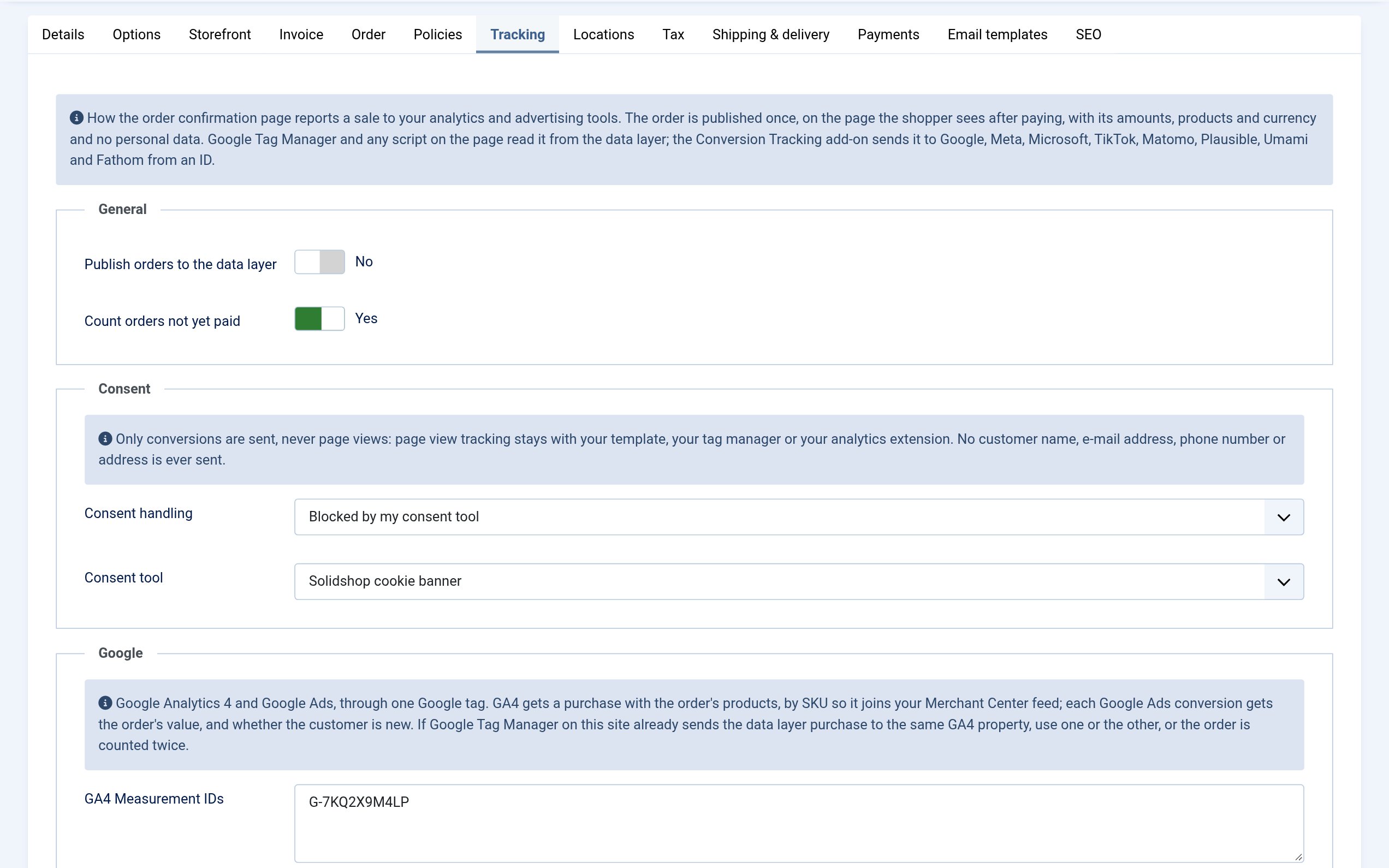
To check it, open the store in a private window, accept the banner and place an order with bank transfer. On the confirmation page, GA4’s DebugView, the Meta Pixel Helper, the UET Tag Helper or the TikTok Pixel Helper show the purchase arrive. Reload the page and nothing is sent again. The dashboard’s Store setup checklist gains a Measure your sales step that links to the tab and ticks once something reports your orders. Every field is described in the Conversion Tracking documentation.
Requirements & availability
Conversion Tracking 1.0.0 needs Solidshop 1.8.0 or later, Joomla 6.0+ and PHP 8.4+; the installer checks first and refuses to run against an older core. Twenty-three admin locales ship in the package.
It is $39, one-time, with 12 months of updates and support included; renewals thereafter are 30% off. Install it on as many sites as you like; support covers one live site per purchase. The code is GPL-3 and runs on your own server: no tracking service between your store and the tools, and no per-order fee.