
A setup wizard for a fresh install, a checklist that tracks what is left, one sitemap for the whole site, and switches for what the product page shows — with Foundra, PayPal Checkout and Downloadable Products updates alongside.
Core 1.6.0 is out, and it is about the part of running a shop that nobody walks through twice: the first hour. A fresh install used to open on a dashboard of zeros and a sample store with somebody else’s address on it, and what came next was up to you. It now opens on a one-page setup wizard, and after that a checklist on the dashboard tells you what is still missing before the shop can take a real order.
Set up your store, on one page
While the store still has the sample email address
(
-
Your store — name, email, phone, address,
country, currency and time zone. The email starts empty on purpose:
order notifications go to it, and an
example.comaddress cannot receive mail. The default shipping location moves to the new address with it, unless you have already moved it yourself. - How you charge tax — I don’t charge tax, One rate for my country (a name such as VAT and a percentage), or I’ll set this up later. Each choice replaces the sample rate, but only while it is still the untouched sample: a store that already has its own tax setup is shown what is there and left alone.
- How customers pay — pick one payment method and fill in its settings right there, the same fields the store’s Payments tab shows. Test credentials are fine; going live is the checklist’s last step.
The wizard keeps no state of its own — there is no half-finished wizard to come back to, only the store record it writes to — and it works without JavaScript, in dark mode and right to left. If you would rather skip it, Use the checklist instead hides it for you alone. The first store guide walks through each field.
A checklist that works it out for itself
The dashboard’s new Store setup panel lists ten steps in two groups. Set up your store: store details, a first product, tax, shipping, a payment method, the shop’s pages on your site, and order emails. Launch: being found by search engines and AI agents, a test order, and switching payments to live mode. Each step links to the screen that completes it, and where a step is half done it says what is missing — No scheduled task exists for the email queue yet.
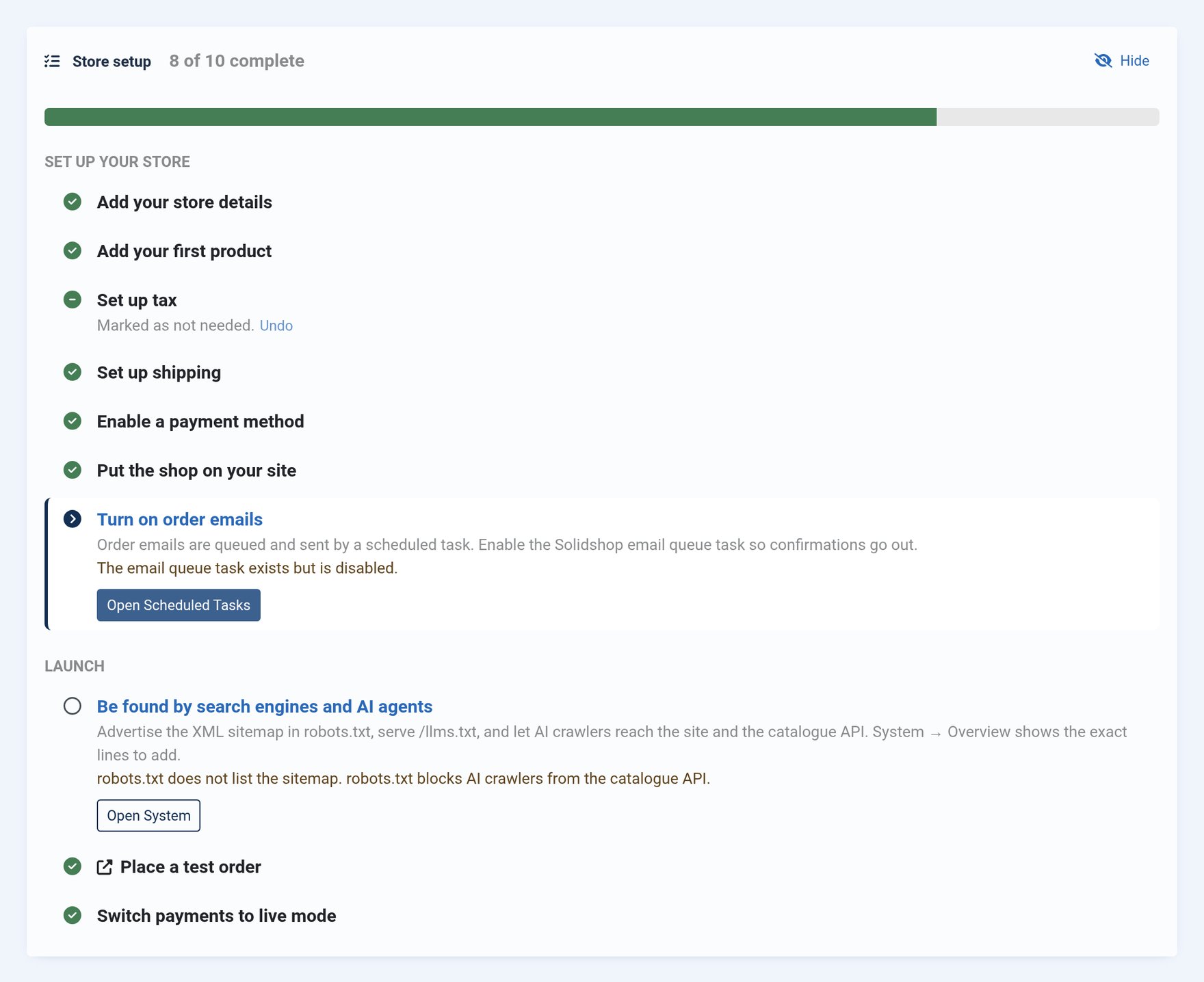
Nothing is ticked by hand. Every step is worked out from the store’s own data each time the dashboard opens, so a step you complete outside the checklist is done, and one you undo — a disabled email task, an unpublished last product — reopens. The only thing it remembers is a decision: tax and shipping can be marked Not needed for stores that don’t charge tax or don’t ship. Any admin can hide the panel for themselves, and once everything is done it collapses to a single line.
Two of the steps catch mistakes that are otherwise silent. Order emails in Solidshop are queued and sent by a scheduled task; if that task is missing or disabled, orders arrive and no confirmation ever goes out. And a payment method left in test mode takes orders that are never paid — the last step names any gateway still in test mode (PayPal reports it from 1.0.3; Stripe and Square from their next releases). Both show up here instead of in a customer’s email.
One sitemap for the whole site
Solidshop’s XML sitemap has covered products and categories since 1.2.0. A shop is more than its catalogue, though — the About page, the shipping policy and the blog all want to be indexed too — and until now that meant installing a second sitemap extension and submitting a second sitemap.
The new core plugin Solidshop - Site Content Sitemap adds your menu items, articles and article categories to the sitemap you have already submitted. It leaves out what should not be there: pages set to noindex, sign-in, search, cart, checkout and account pages, and articles that no menu item leads to. It is enabled on a fresh install and switched on once by this update.
You can also serve the sitemap at the address crawlers look for
first: Options › Sitemap › Serve at
/sitemap.xml. It is off by default, because another extension
may already answer that path, and System ›
Overview warns you when a physical sitemap.xml
file is in the way or the site is set to noindex. Sitemap addresses
now follow the SEF plugin’s Site Domain, so they match
the canonical URLs your pages print.
Choose what the product page shows
A new Storefront tab on the store record has switches for the product page’s sold count, share button and wishlist button. A shop with ten sales does not have to advertise “3 sold”. All three are on by default, so nothing changes until you change it, and they apply in Cassiopeia, Foundra and the booking and download product pages. The sold count is now translated and plural-aware, too — it was hard-coded English.
Order lines keep their history
Editing an order no longer rebuilds it. Saving the order editor used to delete every line and insert it again. The totals came out right, but everything attached to a line went with it: download links, the line type, the product name as it was at the time of sale, and the line ids that reviews and subscriptions point at. Lines are now updated in place, in one transaction, and a line that is already on a shipment cannot be removed. Download links lost this way on an earlier release cannot be recovered; re-issue them by hand.
Order lines record their cost. Each new order line stores the Cost per item at the moment of sale — the variant’s, else the product’s — and never recomputes it when you change the product later. Nothing displays it yet. It is recorded now because a profit report can only ever cover orders placed after recording began, so the sooner it starts, the more history that report will have. Existing lines are left unknown rather than filled in with today’s cost, which would be a guess presented as a fact.
Also in this release
- Tax rates apply where their zone says. A rate’s zone was never consulted, so every rate was charged on every order wherever the shopper was. Checkout now charges the rates whose zone covers the shipping address — a state territory covers that state, a country territory the whole country, and overlapping zones stack — and updates as the address changes. Prices shown before checkout use the store’s own address, and order tax lines record the rate they were charged under.
- “Store default” taxes the product. A product left on - Store default - as its tax class paid no tax at all; it now pays the store’s default class.
- A sample tax setup on fresh installs — a Standard class, an Illinois zone and a 6.25% rate matching the sample store’s address, so a first test order shows a tax line. The wizard replaces it with your own choice.
- Move the sample products to the trash from a notice on the Products list. Only the three seeded products are touched, never one that has been ordered.
- One Product per product page. Product modules shown below a product page declared every card as a Product of its own in the structured data, and a page with several Products loses its rich result in Google. Cards on listing pages now carry an image, description and SKU.
-
The sitemap under load. A sitemap shard that fails
now answers 503 with
Retry-After, so crawlers come back instead of dropping the URLs, and only a guest’s view of the sitemap is ever cached. - 23 admin strings that showed up blank or as a raw language key, including an unnamed entry in a menu item’s Layout dropdown and search boxes with no label. Brands and Stores show their empty-state page when there is nothing in them.
- The loading indicator is announced to screen readers and follows the template’s colour scheme.
- Outline buttons in the dark admin theme were close to unreadable — navy, green, red and blue text on a near-black page. They now use the dark theme’s own colours on every Solidshop admin screen, plugin screens included.
- A store set to UTC was saved as Africa/Abidjan, because the Time zone field had no UTC option. The sample store is set to UTC.
- The Cost per item help text described the compare-at price.
-
The store phone number is now optional. A blank one is left out of
the structured data,
/llms.txt, the catalogue API and the email footer rather than printed empty.
Released alongside 1.6.0
Three extensions have updates that go with this release.
Foundra 1.0.1
The Foundra storefront now follows 1.6.0: its product pages honour the new sold-count, share and wishlist switches, its checkout summary works out tax at the shopper’s address, and its product cards carry the image, description and SKU that search engines want. Tag pages get a Foundra template of their own — they used to fall back to Joomla’s plain Bootstrap list, and now read like the blog. In the header menu, a Menu Heading parent keeps its padding, and every top-level item sits on the same baseline. Foundra 1.0.1 requires Core 1.6.0. Foundra changelog
PayPal Checkout 1.0.3
PayPal Checkout reports to the new setup checklist: the method counts as set up once the credentials for the active mode are filled in, and the checklist flags it while it is still in sandbox mode. It also fixes a card-payment annoyance: PayPal’s card form asked for the billing address again, with State and ZIP empty, because the plugin sent the address without a postal code and with the state’s name where PayPal expects its code. The address now goes over complete, and the shopper is not asked twice. PayPal 1.0.3 still installs on Core 1.3.1 and later. PayPal changelog
Downloadable Products 1.0.1
Downloadable Products now counts every download on the file as well as on the customer’s link, so each file shows a lifetime total on the product’s Downloads tab — and, with the new Show Download Count option, next to the sold count on the product page. An order with download links gets a Downloads panel listing each link’s downloads used, last download, expiry and status, with two buttons for the support requests digital goods bring: Reset Counter gives the customer their full limit again, and Extend Expiry adds days to a link, or revives one that has run out. Both are logged on the order’s timeline; until now the only fix was a new zero-priced order. It still runs on Core 1.4.0 and later. How download counts work · Downloadable changelog
For developers
-
SetupStepsRegisterEventlets an extension add its own step to the setup checklist — “Schedule the download task”, say — placed after any core step. -
SitemapSourcesRegisterEventregisters a paged sitemap source with its own shards in the index, for URL sets that can grow.SitemapUrlsEventstays for small sets. -
PaymentPluginAbstract::isConfigured()andisTestMode()tell the checklist whether a gateway has its credentials and whether it is still in test mode. PayPal Checkout 1.0.3 overrides them; Stripe and Square will in their next releases and work without them in the meantime. -
Solidshop\Lib\Store\StoreParamsandProductPageSettingsread store settings as typed values.
Updating
Core 1.6.0 is a one-click update from System › Update. The schema change is one nullable column on order lines.
Things to do afterwards:
- Check each store’s Tax tab. With tax now charged by zone, a rate on a zone with no territories or on an unpublished zone stops being charged, a shopper outside every zone pays no tax, and products on Store default start paying the default class’s rates. With tax-inclusive prices, a shopper outside every zone pays the same price with no tax taken out of it.
- If you use Foundra, update it to 1.0.1 at the same time. Foundra 1.0.0’s checkout shows tax at the store’s address rather than the shopper’s.
- Update PayPal Checkout and Downloadable Products from the same screen. Neither needs Core 1.6.0, so the order does not matter; Downloadable adds two columns for its counters.
-
Open the dashboard. The setup checklist appears for
admins who manage Solidshop. On an established store it is usually
one line; anything still open — most often the email task or
robots.txt— is worth a look. -
If your template overrides
product/stats.phporproduct/share_wishlist.php, update the override from the new layout, or it will ignore the new product page switches.
The sample tax setup and the sample product fixes apply to fresh installs only; an updated store keeps its own data. For the complete, itemised list of every change, see the Solidshop changelog.